5 quick ways to make your Modelica tool yell at you: demystifying variable variability
I hope you’ve got your preferred drink in hand ☕️🫖💧
Have you ever written what felt like perfectly logical Modelica code, clicked Check Model or Simulate, and been greeted by a wall of red compiler error text? 😅
Modelica is a physical modeling language. To generate efficient simulation code, analyze continuous equations, and maintain structural consistency, your Modelica tool needs to know when every variable is allowed to change.
Today we are talking about variable variability — the hidden hierarchy that governs every variable in your model, and 5 classic ways to break the rules…
Let’s dig in.
The 4 Tiers of Variability
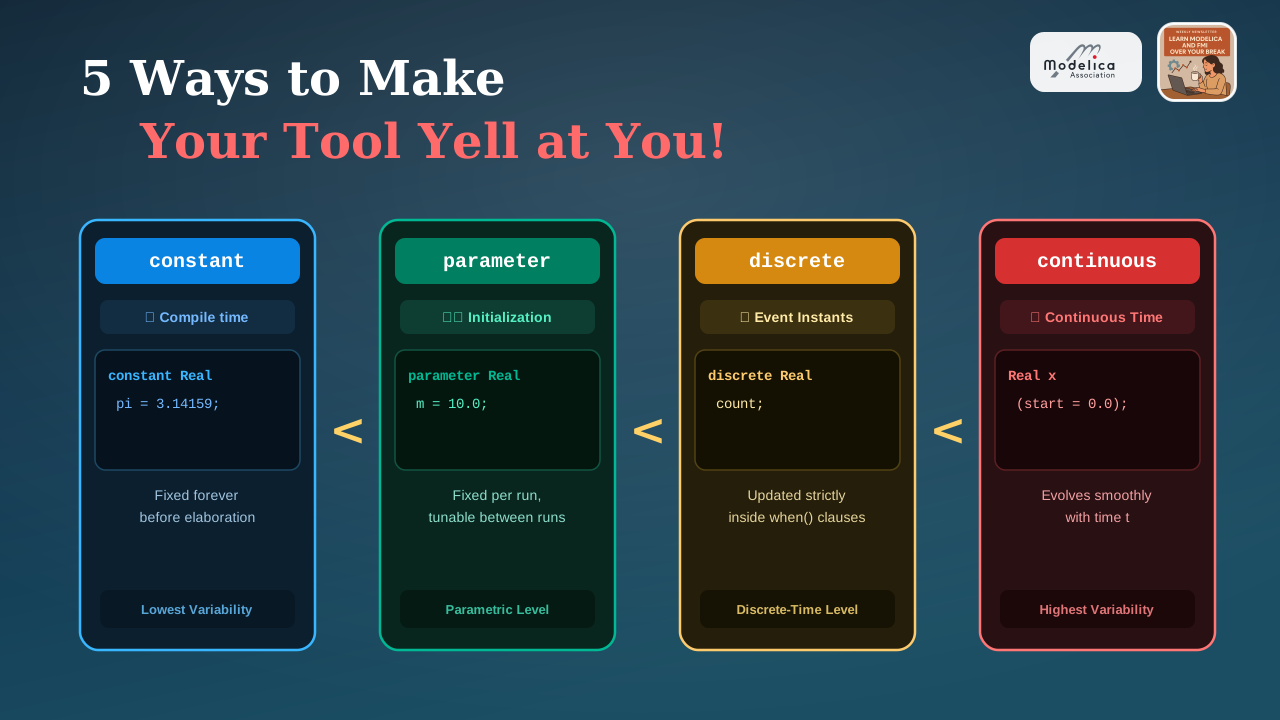
In Modelica, every variable belongs to one of four variability levels. Think of them as a hierarchy ordered by how frequently a value is allowed to change over time:
constant: Values known at compile time. Fixed forever before the model is elaborated or compiled (e.g., Modelica’sModelica.Constants.pi).parameter: Values fixed at run-time initialization. They stay constant throughout a single simulation run, but you can tune them between runs without recompiling your model (just like the mass \(m\) or spring stiffness \(c\) we vectorized back in vectorizing components).discrete: Variables that change value only at specific event instants (like inside awhenclause or discrete clock tick, as we saw in events), remaining strictly constant between events.- continuous (
Real): Continuous-time variables that vary smoothly with time \(t\) according to differential and algebraic equations (like position \(x(t)\) or velocity \(v(t)\)).
The Golden Rule: \(V_{\text{expr}} \le V_{\text{var}}\)
Modelica enforces one fundamental rule when assigning values, binding variables, or forming equations:
\[\text{constant} < \text{parameter} < \text{discrete} < \text{continuous}\]
An expression assigned to a variable must have a variability equal to or lower than the variable’s declared variability:
\[V_{\text{expr}} \le V_{\text{var}}\]
You can always assign a constant or parameter to a continuous variable, but you can never assign a continuous variable to a parameter or constant.
Get this hierarchy backwards, and your Modelica tool will stop you dead in your tracks. Let’s look at 5 ways to trigger those compiler complaints!
Trap 1 — Continuous \(\rightarrow\) Parameter Mismatch
You want a parameter p to take the initial or current value of a continuous state variable x:
model Trap1_ContinuousToParameter
  Real x;
  parameter Real p = x; // ❌ Illegal: x is continuous, p is a parameter
equation
  der(x) = -x;
end Trap1_ContinuousToParameter;
(You can view the full asset model here: Trap1_ContinuousToParameter.mo)
Why your Modelica tool complains:
p is declared as a parameter, meaning its value must be finalized during model initialization. However, x is a continuous-time variable whose value evolves during simulation time integration.
Diagnostic from your Modelica tool: > Incompatible variability. x is non-discrete-time but the expected variability is parametric.
Note that the error message is clear… once you know what the variability hierarchy is! If you don’t, it can be confusing. 😅 I feel you…
Trap 2 — Parameter \(\rightarrow\) Constant Mismatch
You declare a parameter p and try to use it to initialize a constant c:
model Trap2_ParameterToConstant
  parameter Real p = 5.0;
  constant Real c = p; // ❌ Illegal: p is a parameter, c is a constant
end Trap2_ParameterToConstant;
(You can view the full asset model here: Trap2_ParameterToConstant.mo)
Why your Modelica tool complains:
A constant expression must be evaluated during structural elaboration — long before the simulation executable ever starts or reads user parameters. Because p can be changed by a user at runtime right before initialization, your Modelica tool cannot treat p as a compile-time constant.
Diagnostic from your Modelica tool: > Incompatible variability. p is parametric but the expected variability is constant.
Note: why a parameter can change during initialization? You might remember that we can use Modelica acausality to actually compute a parameter value from other variables during the initialization… we did it with the runner in the article 007. This requires being able to change the parameter value during initialization, which is why parameter variability is higher than the one of a constant.
Trap 3 — Modifying a Parameter at Event Instants
You want to update a parameter dynamically when a discrete event fires (for instance, inside a when clause):
model Trap3_ModifyParameterAtEvent
  parameter Real p = 1.0;
equation
  when sample(0, 1) then
    p = 2.0; // ❌ Illegal: parameters cannot be assigned in equations!
  end when;
end Trap3_ModifyParameterAtEvent;
(You can view the full asset model here: Trap3_ModifyParameterAtEvent.mo)
Why your Modelica tool complains:
A parameter is strictly invariant during time integration. If a value changes at an event instant, it is by definition a discrete variable, not a parameter!
Diagnostic from your Modelica tool: > Invalid equation. One side of this equation must have a variability greater than parametric, but the left-hand side is parametric and the right-hand side is parametric.
Note: you can actually NOT set a parameter value in an equation section :)
Trap 4 — Continuous Expression assigned to Discrete outside Events
You declare a variable as discrete, but set it equal to a continuous expression outside an event clause:
model Trap4_ContinuousToDiscrete
  discrete Real d;
equation
  d = sin(time); // ❌ Illegal: continuous expression assigned to discrete
end Trap4_ContinuousToDiscrete;
(You can view the full asset model here: Trap4_ContinuousToDiscrete.mo)
Why your Modelica tool complains:
Because time evolves continuously, sin(time) is a continuous-time expression. Assigning it directly to d in a standard equation means d would have to vary continuously, which breaks d’s discrete declaration. Because d is discrete, the continuous equation solver cannot solve continuous equations for it.
Diagnostic from your Modelica tool: > Variables not solvable in any equation: d
> Equation has no unknown variables to solve for: d = sin(time)
Trap 5 — Dimensioning Vectorized Components with Continuous Variables
Building on what we learned in vectorizing components, you try to compute an array dimension n using a continuous variable x:
model Trap5_DynamicVectorDimension
  import Modelica.Mechanics.Translational.Components.Mass;

  Real x;
  parameter Integer n = integer(x); // ❌ Illegal: x is continuous
  Mass masses[n];
equation
  der(x) = 1;
end Trap5_DynamicVectorDimension;
(You can view the full asset model here: Trap5_DynamicVectorDimension.mo)
Why your Modelica tool complains:
Component array dimensions (like masses[n]) define the static topological structure of the model — the number of equations, states, and elements in the system matrix. They must be known parameter expressions before simulation begins. If n depended on continuous variable x, the model would be adding or removing components mid-simulation! 🤯
Diagnostic from your Modelica tool: > Incompatible variability. .integer(x) is discrete-time but the expected variability is parametric.
Summary Cheat Sheet
| Variability Keyword | Evaluated At | Can Change During Simulation Run? | Permitted Expression Source (\(V_{\text{expr}}\)) |
|---|---|---|---|
constant |
Compile time | ❌ No | Constants, literals |
parameter |
Initialization | ❌ No | Constants, parameters, literals |
discrete |
Event instants | ⚠️ Only at when events |
Constants, parameters, discrete expressions |
continuous (Real) |
Integration step | ✅ Continuously | Anything (\(V_{\text{expr}} \le \text{continuous}\)) |
The END for today
Enough for today! Keep the variability rule \(V_{\text{expr}} \le V_{\text{var}}\) in mind next time your Modelica tool gives you compiler warnings or errors during model checks. 😊
Break is over, go back to what you were doing.
Clem
Next ->
© 2025-2026 Clément Coïc — Licensed under creative commons 4.0. Non-commercial use only.